Introduction
The AWS Cloud Development Kit (AWS CDK) is an open-source software development framework for defining cloud infrastructure in code and provisioning it through AWS CloudFormation.
The AWS CDK consists of two primary parts:
AWS CDK Construct Library — A collection of pre-written modular and reusable pieces of code, called constructs, that you can use, modify, and integrate to develop your infrastructure quickly. The goal of the AWS CDK Construct Library is to reduce the complexity required to define and integrate AWS services together when building applications.
AWS CDK Toolkit — A command line tool for interacting with CDK apps. Use the AWS CDK Toolkit to create, manage, and deploy your AWS CDK projects.
With the AWS CDK, we can put our infrastructure, application code, and configuration all in one place, ensuring that we have a complete, cloud-deployable system at every milestone. We can also employ software engineering best practices such as code reviews, unit tests, and source control to make your infrastructure more robust.
Working of AWS CDK
At its core, the CDK leverages the power of object-oriented programming, enabling developers to model and compose infrastructure components as reusable classes. This paradigm shift not only enhances the readability and maintainability of infrastructure code but also allows for the integration of infrastructure logic with application logic.
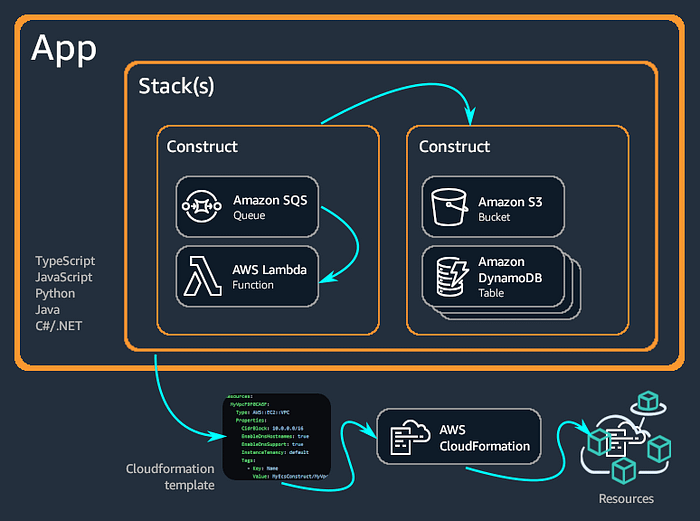
The AWS CDK supports various programming languages like TypeScript, JavaScript, Python, Java, C#, .Net, and Go. You can use any of these supported programming languages to define reusable cloud components known as constructs. You compose these together into stacks and apps. Then, you deploy your CDK applications to AWS CloudFormation to provision or update your resources.
Benefits of using AWS CDK
Many benefits come with using AWS CDK. These advantages also answer the question that comes to mind: why use AWS CDK over other IaC tools? 🤔
Some of the advantages of using CDK are outlined below:
Develop and manage your infrastructure as code (IaC): CDK allows topractice infrastructure as code to create, deploy, and maintain infrastructure in a programmatic, descriptive, and declarative way. With IaC, you treat infrastructure the same way developers treat code.
Familiar Programming Languages: One of the most significant advantages of AWS CDK is the ability to use familiar programming languages. This reduces the learning curve for developers who are already proficient in languages like Python or TypeScript, allowing them to leverage their existing skills for infrastructure development.
High-Level Constructs: AWS CDK provides high-level constructs that encapsulate best practices and simplify the process of defining AWS resources. These constructs can be composed, extended, and reused, promoting modular and maintainable code.
Deployment through CloudFormation: AWS CDK integrates with AWS CloudFormation to deploy and provision your infrastructure on AWS. With AWS CloudFormation, you can perform infrastructure deployments predictably and repeatedly, with rollback on error.
Reusability and Sharing: CDK constructs can be packaged and shared as libraries, promoting reuse across projects and teams. This not only saves time but also ensures consistency and adherence to organizational standards.
Testing and Validation: AWS CDK supports testing and validation of infrastructure code through unit tests and integration tests. This capability ensures that infrastructure changes are reliable and do not introduce regressions.
Key Concepts
The following are important concepts of CDK that form its basis and are therefore necessary to grasp.
Constructs
Constructs are the fundamental building blocks in AWS CDK. They represent AWS resources and are used to define the desired state of your cloud infrastructure. Constructs can range from simple AWS services, like an S3 bucket or an EC2 instance, to complex multi-resource applications. Constructs are organized into three levels:
L1 Constructs: Direct mappings to AWS CloudFormation resources.
L2 Constructs: Higher-level abstractions that provide sensible defaults and simplify resource configuration.
L3 Constructs: Patterns that combine multiple L2 constructs to model more complex architectures.
Stages
In AWS CDK, stages refer to different phases in the lifecycle of your cloud application. The primary stages are:
Synthesize: This stage involves converting the high-level constructs defined in your code into AWS CloudFormation templates. The cdk synth command generates these templates, which can then be inspected and validated.
Deploy: During the deployment stage, the synthesized CloudFormation templates are submitted to AWS to create or update the specified resources. The cdk deploy command handles this process, ensuring that your infrastructure is provisioned according to the defined constructs.
Other Phases: CDK also supports additional phases like cdk diff to compare changes before deployment and cdk destroy to remove deployed resources.
Languages
AWS CDK supports multiple programming languages, allowing developers to use their preferred language for defining infrastructure. The primary supported languages include:
Python: Popular for its simplicity and readability, making it accessible for both beginners and experienced developers.
TypeScript: Offers strong typing and autocompletion, enhancing the development experience and reducing errors.
JavaScript: Widely used in web development, providing a familiar environment for many developers.
Java: Preferred for enterprise applications, offering robust tooling and a strong ecosystem.
C#: Popular among .NET developers, providing seamless integration with existing .NET applications.
CDK Constructs in Action 🚀
Now, we shall see more in-depth explanations of constructs along with real code examples.
Note: It is to note that the code samples provided are to be used for reference only as they are subject to change depending on CDK versions. For writing actual code, you can reference your preferred language CDK documentation.
L1 Construct:
Example: aws-s3.CfnBucket
Explanation: L1 constructs such as aws-s3.CfnBucket, directly map to AWS CloudFormation resources. They provide low-level control over AWS services by exposing all properties and configurations available in CloudFormation templates.
Use Case: You would use aws-s3.CfnBucket when you need precise control over every aspect of your Amazon S3 bucket configuration. This includes settings like bucket policies, lifecycle rules, and versioning directly from your CDK code.
from aws_cdk import core
from aws_cdk.aws_s3 import CfnBucket

class MyStack(core.Stack):

    def __init__(self, scope: core.Construct, id: str, **kwargs) -> None:
        super().__init__(scope, id, **kwargs)

        # Define an S3 bucket using L1 construct
        bucket = CfnBucket(self, "MyTestBucket",
            bucket_name="my-test-bucket",
            access_control="Private",
            versioning_configuration={"status": "Enabled"}
        )
L2 Construct:
Example: aws-s3.Bucket
Explanation: L2 constructs like aws-s3.Bucket, offer a higher-level abstraction compared to L1 constructs. They simplify the creation and management of AWS resources by providing sensible defaults and methods to configure common settings.
Use Case: With aws-s3.Bucket, you can create an S3 bucket with minimal configuration. It automatically handles defaults such as encryption, access control, and versioning. This abstraction makes it easier to manage S3 buckets in your infrastructure code without diving into low-level details.
from aws_cdk import core
from aws_cdk.aws_s3 import Bucket

class MyStack(core.Stack):

    def __init__(self, scope: core.Construct, id: str, **kwargs) -> None:
        super().__init__(scope, id, **kwargs)

        # Define an S3 bucket using L2 construct
        bucket = s3.Bucket(self, "MyTestBucket",
            bucket_name="my-test-bucket",
            versioned=True
        )
L3 Construct:
Example: aws_apigateway.LambdaRestApi
Explanation:L3 constructs combine multiple AWS resources into higher-level patterns or best-practice solutions. They simplify the deployment of complex architectures by abstracting away low-level details.
Use Case: aws_apigateway.LambdaRestApi sets up an API Gateway REST API with integration to AWS Lambda functions, automating the setup of API endpoints and serverless compute resources.
from aws_cdk import core
from aws_cdk.aws_apigateway import LambdaRestApi
from aws_cdk.aws_lambda import Function, Runtime, Code

class MyStack(core.Stack):

    def __init__(self, scope: core.Construct, id: str, **kwargs) -> None:
        super().__init__(scope, id, **kwargs)

        # Define an AWS Lambda function
        my_lambda = Function(self, "MyLambdaFunction",
            runtime=Runtime.PYTHON_3_8,
            handler="index.handler",
            code=_lambda.Code.from_asset('lambda')
        )

        # Create a REST API with Lambda integration using L3 construct
        api = LambdaRestApi(self, "MyApi",
            handler=my_lambda
        )
By using constructs, you can encapsulate configuration details and create reusable components, making your infrastructure code more modular and maintainable.
Installing AWS CDK for Python:
Please follow the following steps to successfully install AWS CDK on your local machine:
Step 1: Install Node.js and npm
Since AWS CDK is based on Node.js so regardless of your preferred programming language for coding, Node.js is a prerequisite for it. You would require node.js version 4.15.0 or later.
Download and install from Node.js official website depending on your operating system. To install it on Linux, you can use following commands:
# Installs fnm (Fast Node Manager)
curl -fsSL https://fnm.vercel.app/install | bash

# Download and install Node.js
fnm use --install-if-missing 20

# Verifies the right Node.js version is in the environment
node -v

# Verifies the right NPM version is in the environment
npm -v
You can verify your installation using the following commands:
node -v
npm -v
Step 2: Install AWS CLI (Command Line Interface)
You can install AWS CLI from the official documentation depending upon your operating system. For Linux, you can install it using the following commands:
curl "https://awscli.amazonaws.com/awscli-exe-linux-x86_64.zip" -o "awscliv2.zip"
unzip awscliv2.zip
sudo ./aws/install
Configure the AWS CLI with your AWS credentials:
aws configure
Step 3: Install language specific dependencies
Some prerequisites depend on the programming language that you have selected to be used in CDK. You can find your language specific dependencies from the documentation here.
The pre-requisites for using Python language is using
Python 3.7 or later including pip and virtualenv
You can install pip and virtualenv using the following commands:
python --version #check your python version
python -m pip install --upgrade pip #Installs & upgrades pip
python -m pip install --upgrade virtualenv #Installs & upgrades virtualenv
Step 4: Install AWS CDK CLI
The final step is to install AWS CDK and it can be done using Node package manager. It’s recommended to install it globally using the following command:
npm install -g aws-cdk
To install a specific version of CDK CLI, you can use the following command:
npm install -g aws-cdk@X.YY.Z
Finally, run the following command to verify a successful installation. The CDK CLI should output the version number:
cdk --version
If you receive an error message, try uninstalling the AWS CDK CLI by running the following command and then repeat the steps to reinstall the AWS CDK CLI.
npm uninstall -g aws-cdk
Creating your first AWS CDK app
The following are steps to create your first AWS CDK app.
Step 1: Create your CDK project directory
In this step, you create a new CDK project. A CDK project should be in its own directory, with all its local module dependencies.
Start by creating a directory of your choice, create and navigate to a directory, in my case, it’s with the name demo-cdk
mkdir demo-cdk && cd demo-cdk
Step 2: Create your CDK project
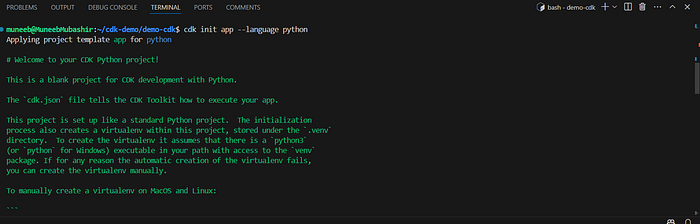
Next, initialize a new CDK project from the created directory using the AWS CDK CLI cdk init command. You must also specify the app template and your preferred programming language with the --language option. In our case, it’s Python language so the following is the command to execute:
cdk init app --language python
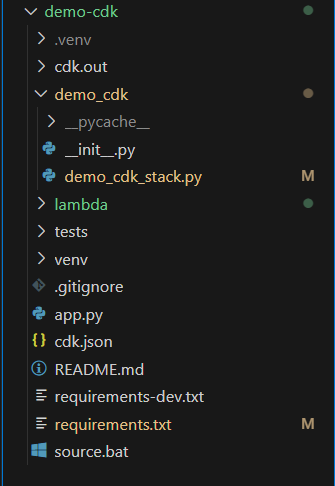
At this point, your directory structure should look something similar to this:
Understanding the directory structure created by CDK
The cdk init has created a structure of files and folders within the demo-cdk folder to help organize the source code that you need for the CDK app. This structure of files and folders is called CDK Project.
During project initialization, the CDK CLI creates a CDK app containing a single CDK stack. The CDK app instance is created using App construct. The following is the portion of code from the app.pyfile.
#!/usr/bin/env python3
import os

import aws_cdk as cdk

from demo_cdk.demo_cdk_stack import DemoCdkStack

app = cdk.App()
DemoCdkStack(app, "DemoCdkStack",
    # Uncomment the next line if you know exactly what Account and Region you
    # want to deploy the stack to.
    #env=cdk.Environment(account='123456789012', region='us-east-1'),
    )

app.synth()
The CDK stack is created using the Stack construct. The following is the portion of code for reference and this code is present in the file demo_cdk_stack.py created inside demo_cdk folder.
from aws_cdk import (
    Stack,
)
from constructs import Construct

class DemoCdkStack(Stack):

    def __init__(self, scope: Construct, construct_id: str, **kwargs) -> None:
        super().__init__(scope, construct_id, **kwargs)

# Define your constructs here.
Step 3: Initialize and activate virtual environment
After creating the app, you also need to enter the following commands. These activate the app’s Python virtual environment.
source .venv/bin/activate
python -m pip install -r requirements.txt
Sometimes, running source .venv/bin/activate can give the following error:
In such cases, you can perform the following remediation measures:
Make sure that virtualenv is properly installed. For this, you can run the following commands on the terminal:
pip install --upgrade virtualenv # Installs or upgrades virtualenv in your system
virtualenv -p python3 venv #Creates a virtual environment in your project directory
Activate the virtual environment using the following command.
source venv/bin/activate
Step 4: Install core CDK dependencies
In this step, you need to install AWS CDK core dependencies and they can be done by running the following command. These dependencies are installed from the requirements.txt file.
python -m pip install -r requirements.txt
Step 5: Coding your App
I have created a sample CDK code with some constructs so that we get to know the real-world example of provisioning infra using CDK. The following is my CDK code.
# This file location in my directory structure -> demo_cdk/demo_cdk_stack.py
from aws_cdk import (
    Stack,
    App,
    Duration,
    aws_s3 as s3,
    aws_lambda as _lambda,
    aws_iam as iam,
    custom_resources as cr,
    RemovalPolicy
)
from constructs import Construct
import os

class DemoCdkStack(Stack):

    def __init__(self, scope: Construct, construct_id: str, **kwargs) -> None:
        super().__init__(scope, construct_id, **kwargs)

        # Create an S3 bucket
        bucket = s3.Bucket(self, "demoS3Bucket",
            removal_policy=RemovalPolicy.DESTROY,
            auto_delete_objects=True)

       # IAM Role for Lambda Function
        lambda_role = iam.Role(self, "LambdaRole",
            assumed_by=iam.ServicePrincipal("lambda.amazonaws.com")
        )
        lambda_role.add_to_policy(iam.PolicyStatement(
            resources=['*'],
            actions=["s3:*"]
        ))

        lambda_function = _lambda.Function(self, "DemoLambda",
            function_name="demo-lambda",
            runtime=_lambda.Runtime.PYTHON_3_11,
            handler="lambda_function.lambda_handler",
            code=_lambda.Code.from_asset('lambda'),
            role=lambda_role,
            timeout=Duration.minutes(5),
            environment={
                        "BUCKET_NAME": bucket.bucket_name
                        }

        )

        #Custom Resource to trigger Lambda created above
        custom_resource= cr.AwsCustomResource(
            self, "TriggerLambda",
            policy=cr.AwsCustomResourcePolicy.from_statements([
                iam.PolicyStatement(
                    actions=["lambda:InvokeFunction"],
                    resources=["*"]
                )
            ]),
        on_create=cr.AwsSdkCall(
            service='Lambda',
            action='invoke',
            parameters={
                'FunctionName': lambda_function.function_arn,
                'InvocationType': 'Event',
            },
            physical_resource_id=cr.PhysicalResourceId.of('TriggerLambdaCustomResource')
        ),
        )
Step-wise breakdown of code
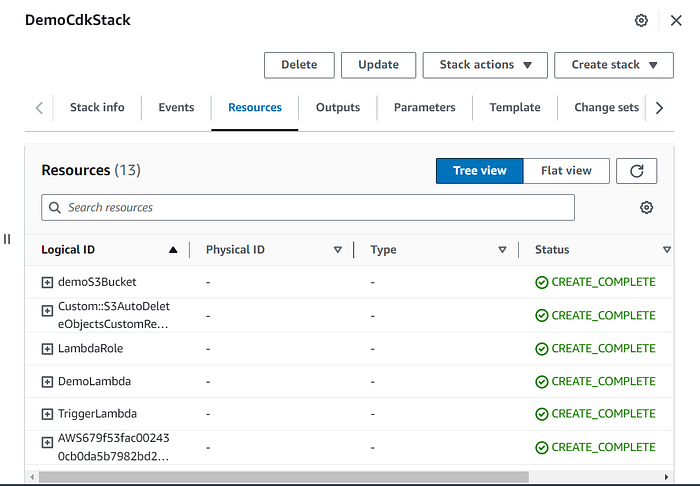
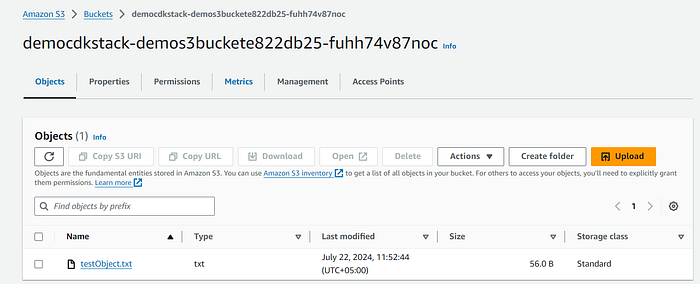
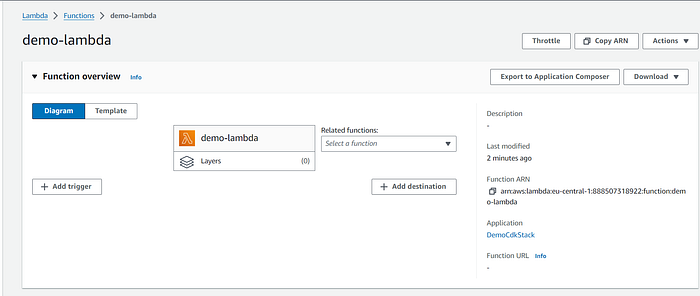
In the sample code, an S3 bucket named demoS3Bucket is created first. Following this, a Lambda function called demo-lambda is set up to upload a file to the created S3 bucket. The Lambda function is triggered upon its creation to upload the file, achieved by using a custom resource named TriggerLambda. This custom resource invokes the Lambda function upon its creation. Additionally, a role is created to grant the necessary permissions for the Lambda function to perform operations on the S3 bucket.
Step 6: Bootstrap & Deploy CDK App
Once we are done with the coding of our CDK app, we need to **bootstrap** the environment on AWS and then finally deploy our app to the AWS account.
Pre-req for this step
Make sure, your aws credentials are configured in AWS CLI. You can check by aws configure list and can configure using aws configure command.
cdk bootstrap
Once, the environment is successfully bootstrapped, we can now deploy our stack to our AWS account using the following command
cdk deploy
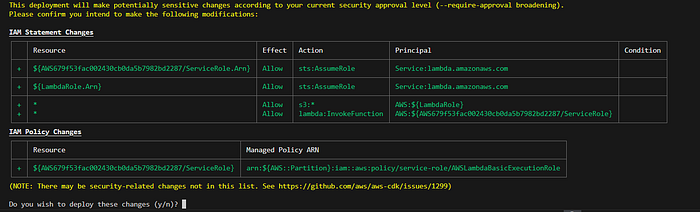
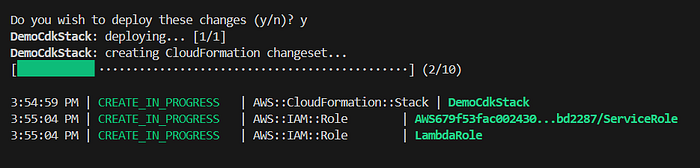
It will list all the changes that will be done and the resources that will be provisioned in the AWS account. After reviewing the changes, enter y to start deploying resources.
Step 7: Reviewing deployed resources
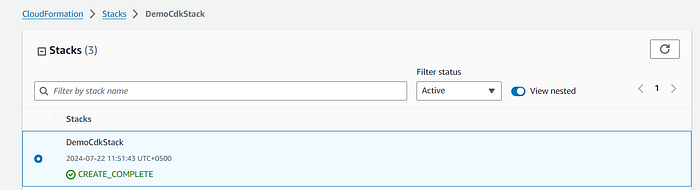
Once stack is done its deployment, we can head over to cloudformation console to review our stack deployed. In our case its with name DemoCdkStack
At this point, as you can see from the above screenshots all resources are successfully deployed to the AWS account including S3 bucket, Lambda and the test object is also uploaded in the bucket which shows that the lambda function was also invoked on its creation through custom resource.
Useful CDK Commands
I have compiled some useful CDK commands for reference and they can come in handy when interacting with AWS CDK using CLI. Their detailed explanations and usage can be referenced **here**.
Conclusion
In this deep dive into AWS CDK, we’ve explored the powerful capabilities of mastering Infrastructure as Code (IaC) using Python. By leveraging AWS CDK, developers can define cloud infrastructure in a familiar programming language, offering a more intuitive and flexible approach to managing resources compared to traditional methods like JSON or YAML-based templates.
In conclusion, AWS CDK with Python transforms the way we approach cloud infrastructure, making it more accessible, efficient, and powerful. By mastering these tools and techniques, you can elevate your cloud infrastructure management to new heights, driving innovation and operational excellence in your projects.
Embark on your AWS CDK journey today and unlock the full potential of Infrastructure as Code with Python. Happy coding! 🚀
References
https://docs.aws.amazon.com/cdk/v2/guide/hello_world.html
https://docs.aws.amazon.com/cdk/v2/guide/getting_started.html
https://www.npmjs.com/package/aws-cdk
https://docs.aws.amazon.com/cdk/api/v2/python/