How can utilizing SPOT Instances in EKS clusters help us cut cloud costs while maintaining the performance and availability of containerized workloads?
— -
In the era of cloud computing, managing costs while maintaining performance is a constant challenge for businesses. Amazon EKS (Elastic Kubernetes Service) offers a powerful solution for running containerized applications at scale, but it can come with a hefty price tag.
Before diving into the use of SPOT Instances in EKS clusters, let’s address some key questions:
What exactly SPOT Instances are, and their trade-offs?
Which types of workloads are best suited for SPOT Instances?
How can SPOT Instances be integrated into EKS workloads?
Comparison of Costs with On-Demand Instances?
Downtime associated with Spot Instances?
What are the best practices and recommendations for using them?
SPOT Instances
SPOT Instances are discounted, unused cloud resources offered by AWS, allowing you to run workloads at a significantly lower cost compared to On-Demand instances, with the trade-off being that they can be reclaimed by AWS with short notice.
Types of Workload best suited for SPOT Instances
Spot instances in Kubernetes clusters are typically recommended for stateless, fault-tolerant, and non-critical workloads due to their inherently transient nature. Here are some workload types that are suitable for running on-spot instances in a Kubernetes cluster:
Batch Processing Jobs: Ideal for non-urgent, large-scale data tasks that can tolerate interruptions.
Containerized Web Applications: Great for stateless apps that scale horizontally, with load balancers and auto-scaling ensuring availability despite instance terminations.
Dev/Test Environments: Perfect for flexible, dynamic provisioning, offering significant cost savings for developers.
Big Data Processing: Distributed frameworks like Apache Spark or Hadoop can efficiently utilize SPOT Instances, handling node failures gracefully.
Containerized Stateful Applications with Replication: Suitable for stateful apps designed for replication, like distributed databases, that can tolerate node failures.
Non-critical Backend Services: Good for non-essential services that can handle occasional disruptions without affecting core functionality.
— — — — —
Enough of boring stuff? Hmm… Let’s jump straight into implementing SPOT Instances for EKS workloads in your cluster. Cool & amazing stuff coming up, hunh!
Spot Instances on EKS
The following are the steps to use Spot Instance on EKS:
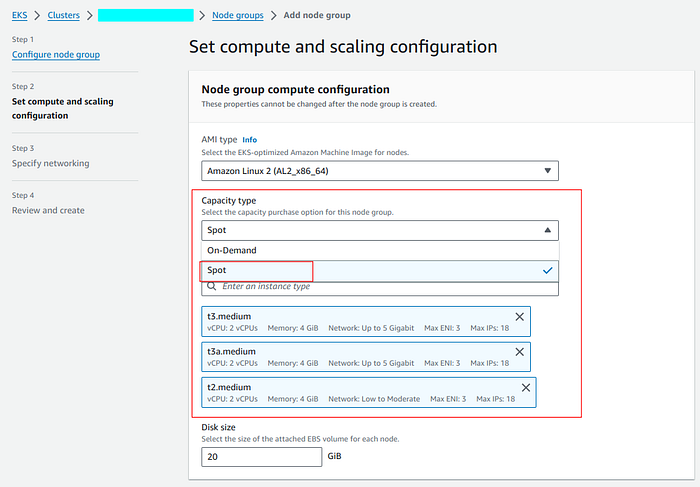
1. To utilize spot instances in EKS, select capacity type as spot while creating a node group, shown below:
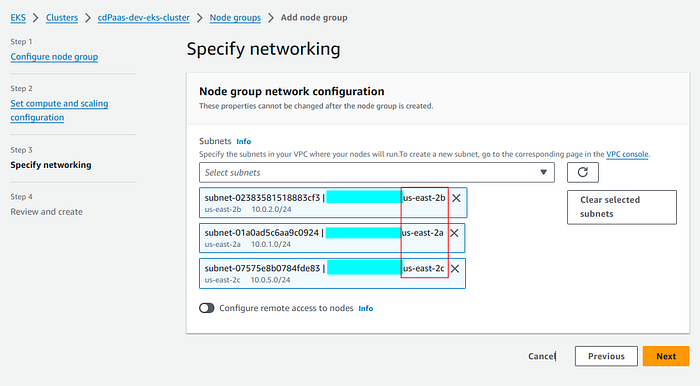
2. Select multiple subnets while utilizing all AZs of the region.
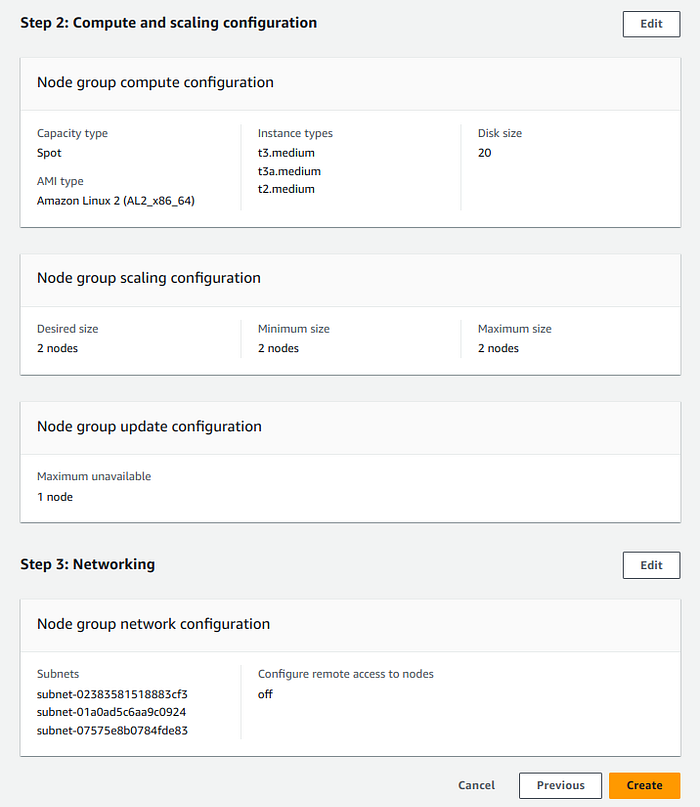
3. Review and create the node group with SPOT capacity type.
There you go 🎉 .. That’s it. Isn’t it very easy to utilize spot instances in EKS clusters?
Downtime with Spot Instance
When using spot instances in EKS, One should remember that when EC2 needs the capacity back, the Spot Instance service arbitrarily sends Spot interruption notifications to instances within the associated Spot capacity pool. This Spot interruption notification lands in both the EC2 instance metadata and Eventbridge.
Two minutes after the Spot interruption notification, the instance is reclaimed
Cost Comparision with On-demand Instances
Spot instances are very cheap, as compared to on-demand instances, and offer cost savings of up to 90%, making them a highly economical option for running flexible workloads.
Best Practices
Use cluster-autoscaler as a node auto-scaling solution and run it on a separate node group.
Use diversified Spot Instance node groups i.e. multiple instance types.
Use a Capacity-optimized Spot allocation strategy for spot instances.
To mitigate the impact of potential Spot Instance interruptions, leverage the ‘node termination handler’.
Use maximum Spot capacity pools to increase the stability and resilience of the application.
Spot capacity pools = (Availability Zones) * (Instance Types)
Congrats, you’ve made it to the end. I would like to hear your opinions about this solution. Feel free to ask questions or give suggestions about this post.
Happy learning :)!