

Utilize Apache Jmeter to Load Test FreeRadius for MAC Authentication
Introduction
In network environments, MAC Authentication using RADIUS is an efficient way to enforce access control. This approach ensures that only devices with pre-approved MAC addresses can connect to the network, adding an additional layer of security. In this blog, we will explore the key concepts of MAC Authentication using RADIUS, set up a testing environment, and perform authentication tests using tools like Apache JMeter.
What is RADIUS?
RADIUS (Remote Authentication Dial-In User Service) is an AAA (Authentication, Authorization, and Accounting) protocol. It facilitates centralized management for verifying credentials, authorizing access to resources, and accounting for user activities. RADIUS supports large-scale deployments with high traffic and is a popular choice for enterprise-grade security systems.
What is MAC Authentication?
MAC Authentication is a method of granting network access based on the MAC address of a device. It is often employed in scenarios where user credentials are unavailable or impractical. RADIUS servers validate the MAC address against a pre-configured list to determine whether to grant access.
How Does MAC Authentication Work with RADIUS?
A network device (NAS) receives a connection request from a client.
The NAS sends the client’s MAC address to the RADIUS server as the username and password.
The RADIUS server checks the MAC address against its user database or an external authentication source.
Based on the response, the NAS either grants or denies access:
Access-Accept: The MAC address is valid and authenticated.
Access-Reject: The MAC address is invalid.
Access-Challenge: Additional information is required.
Setting Up a Test Environment
To test MAC Authentication using RADIUS, follow these steps:
1. Install and Configure FreeRADIUS

FreeRADIUS is a widely used open-source RADIUS server. Install it on a Linux system and configure the following files:
1. clients.conf
Add the IP address of the NAS and define a shared secret for communication.
client 192.168.1.1 { secret = testing123 shortname = NAS }
2. users:
Add the MAC addresses to be authenticated.
00:11:22:33:44:55 Cleartext-Password := "00:11:22:33:44:55"
2. Prepare JMeter for RADIUS Testing
Apache JMeter, a popular performance testing tool, supports RADIUS protocol testing through plugins.
Download the
RadiusSampler.jarplugin and place it in JMeter’slib/extdirectory.Restart JMeter.
Create a new test plan with a Thread Group and add the Radius Protocol Sampler.
3. Configure the JMeter Test Plan
In the Radius Protocol Sampler:
Server IP: The IP address of the RADIUS server.
Request Type: Authentication.
Auth Port: 1812 (default RADIUS authentication port).
Shared Secret: The secret defined in
clients.conf.Username and Password: The MAC address of the client (e.g.,
00:11:22:33:44:55).
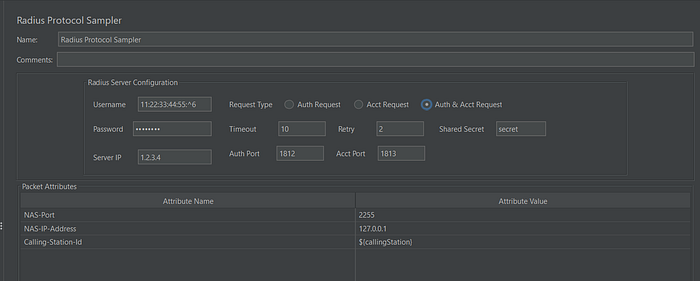
Dummy data added to Radius Protocol Sampler
Testing MAC Authentication
After setting up JMeter, execute the test plan:
Add a Listener (e.g., View Results Tree) to view request and response details.
Run the test and verify that the RADIUS server responds with
Access-Acceptfor valid MAC addresses andAccess-Rejectfor invalid ones.Scale the test by adding a CSV Data Set Config with multiple MAC addresses to simulate bulk authentication requests.
Example JMeter Script for MAC Authentication
import org.tinyradius.packet.*;
import org.tinyradius.util.*;
RadiusClient radiusClient = new RadiusClient(vars.get("serverIP"), vars.get("sharedSecret"));
AccessRequest accessRequest = new AccessRequest(vars.get("macAddress"), vars.get("macAddress"));try {
    RadiusPacket response = radiusClient.authenticate(accessRequest);
    if (response.getPacketType() == RadiusPacket.ACCESS_ACCEPT) {
        log.info("Authentication successful for MAC: " + vars.get("macAddress"));
    } else {
        log.error("Authentication failed for MAC: " + vars.get("macAddress"));
    }
} catch (Exception e) {
    log.error("Error during authentication: " + e.getMessage());
}
Best Practices for MAC Authentication Testing
Secure Communication: Use secure protocols like IPsec to protect RADIUS traffic.
Load Testing: Simulate high traffic scenarios to test RADIUS server scalability.
Logging: Enable detailed logging in FreeRADIUS to diagnose issues.
Timeouts and Retries: Configure appropriate timeout and retry settings in JMeter to handle network delays.
Conclusion
MAC Authentication using RADIUS provides a robust mechanism to control network access based on device identity. By using tools like FreeRADIUS and JMeter, you can efficiently test and optimize your authentication setup.